
No, Really, Customizing Chrome Is Easy Now
A Claude Code post

I keep seeing people say that Claude Code makes basic software arbitrarily easy to create. Skilled professional coders still have an edge for some things some of the time, but a curious layperson can whip up a basic app simply by asking for it.
In the general case, I am not entirely convinced. My own forays with AI assisted software production have benefited a lot from my actual knowledge; the models bark up the wrong tree a few times before you get them there, even for simple stuff. But in the specific case of Chrome extensions, yep, ask and you shall receive.
I’m not aware of a simple canonical post about this, with examples. So here’s mine.
Prerequisites
You’ll need a Claude pro account. They cost $20 a month. Once you have one, setting up Claude Code is really easy. In fact, you can just ask Claude how to do it. Or follow the instructions here.
What To Actually Do
Make a folder somewhere on your computer.
Open a terminal in the folder (on Windows you can do this in the right click menu).
Type “claude” in the terminal (without the quotation marks).
Ask for the thing you want, and give Claude permission to mess around in the new, empty folder you just made.
It’s possible Claude will ask for other weird or fishy stuff, if it gets on the wrong track. You can just veto that if so. For most things you might ask for, it’s not much of a risk.
When Claude is done, it’ll tell you how to load your browser extension into Chrome. Which takes about 10 seconds, and is very easy. Then you can test it, and iterate as needed. I’ve done the whole process more than once. It takes like five minutes. And then your web browsing experience is permanently improved.
Examples
The proof’s in the pudding! So here are three extensions I’ve made.
Custom New Tab
I often use pastebin to write out little to-do lists for the day, or keep track of goals. I decided it’d be nicer if whenever I opened a new tab in Chrome, I could immediately see my goals, and had a little text field to write stuff down. Within a few minutes, Claude Code achieved this for me.

Handy! I can hear skeptics chiming in now, saying “yes, but to-do lists are easy peasy sample projects that everyone knows AI can do.” To which my reply is “yes, which is exactly why to ask for one.”
Spreadsheet Populator
There’s a Google Sheet that I regularly add rows to. In the past, I had to henpeck a bunch of specific fields from multiple other tabs, as the last step in some long and boring of record keeping.
I put examples of the relevant webpages in a directory for Claude (you can just download webpages, it’s perfectly legal), and it made an extension where I click a button, and all the data is copied to a table row I can paste. Saving me five minutes a few times a week, into the indefinite future.
Wolfe Glick Censor
I like Wolfe Glick videos. He plays competitive Pokemon, and has high production values. But he’s also an ambitious YouTuber, and apparently what makes people click on videos is the title “I WON TOURNAMENT X.” Thus, I always know the ending in advance of watching one of his videos; if he says anything other than “I WON” I know he’s going to lose.
So I had Claude make a browser extension to do this:
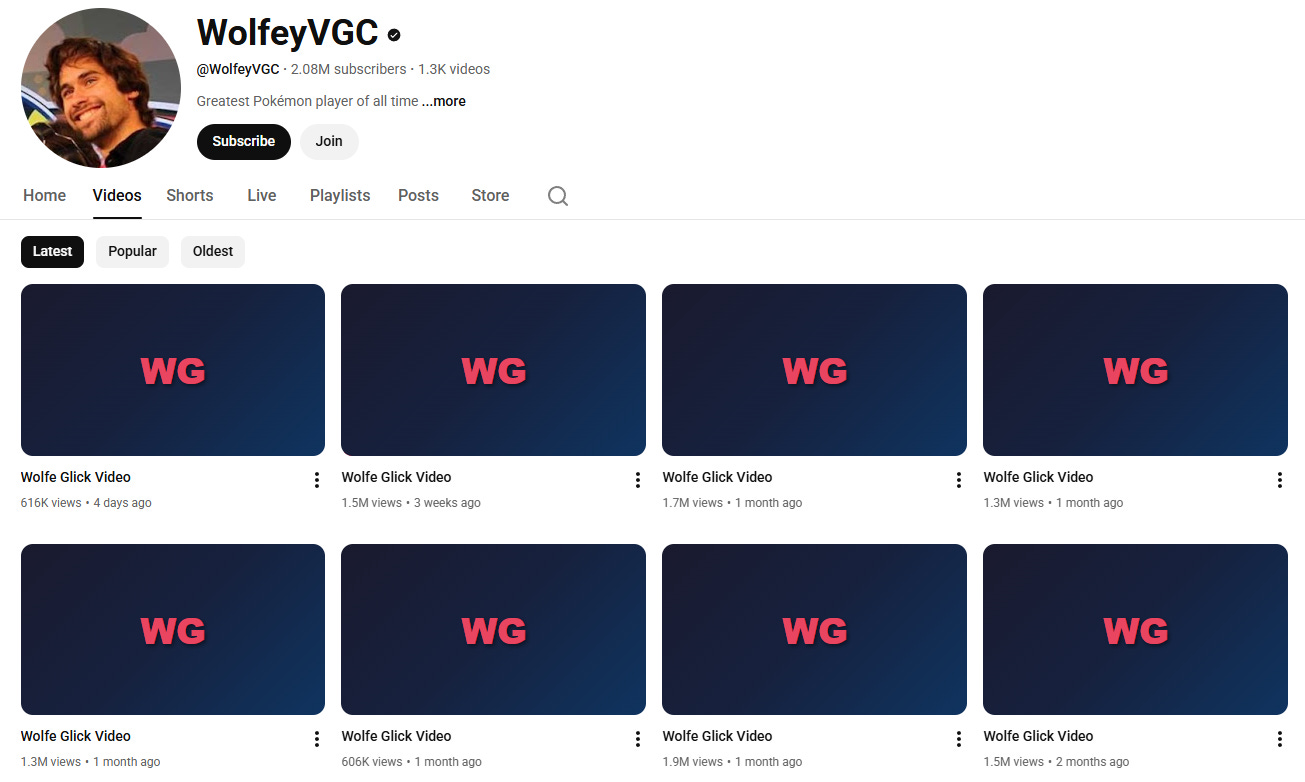
It also hides how long each video is, and how far along I am when watching, so I won’t know by there being five minutes left that he’s about to be eliminated.
There are still some bugs on this one; it only works reliably on his channel. Is it worth the more than five minutes it might take to fix that? I don’t know! But on the very first try it got a lot of the benefit; I can mosey on over to his channel and have a spoiler-free experience from now on.
Go Forth!
It is an exciting time. Think for a few minutes about what has annoyed you online lately. Maybe you can solve it.